Can employees use online PDF compressors at work? What businesses need to know
- Laurent Meyer
- Business application, Data security
- March 15, 2026
Every day, employees across the world compress PDF files before emailing them to clients, uploading them to portals, or archiving them internally. Most reach for the first free online tool they find on Google. But should they?
If you’re in IT, compliance, or management, this is worth thinking about — because the answer isn’t straightforward.
The question every IT team should be asking
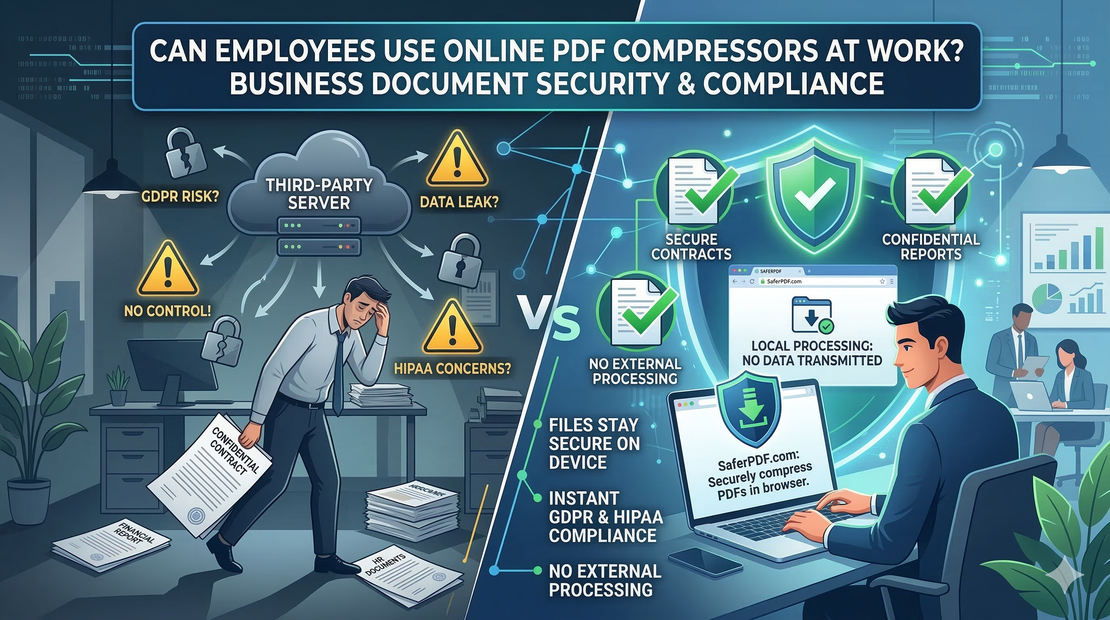
When an employee uploads a company document to an online PDF compressor, that file travels to a third-party server. The compression happens there, and then the result is sent back.
This raises a few questions that most employees never think about:
- Where is that server located? Is it in a jurisdiction that aligns with your data protection obligations?
- How long is the file stored? Many services retain files for hours or days — some don’t specify at all.
- Who has access? The service provider’s employees, subcontractors, or automated systems may process the data.
- Is there a Data Processing Agreement (DPA) in place? Under GDPR and similar regulations, transferring personal data to a processor requires one.
We’re not saying these services are doing anything wrong. Many of them are reputable companies with solid security practices. But the reality is: you can’t fully verify what happens to your file once it leaves your network. And for many businesses, that uncertainty alone is enough to be a problem.
What kind of documents are we talking about?
Think about the PDFs your team compresses on a daily basis:
- Contracts and proposals — containing pricing, terms, and client details
- Financial reports — with revenue figures, forecasts, and banking information
- HR documents — employee records, payslips, performance reviews
- Legal filings — NDAs, court documents, regulatory submissions
- Client deliverables — reports and presentations with proprietary data
- Medical or insurance forms — with personally identifiable information
These aren’t generic marketing brochures. They’re documents that your company has a legal and ethical obligation to protect.
The compliance angle
Depending on your industry and location, uploading business documents to third-party servers may conflict with:
- GDPR (EU/EEA) — Requires lawful basis for processing personal data, data minimisation, and appropriate safeguards for international transfers
- HIPAA (US healthcare) — Requires Business Associate Agreements for any third party handling Protected Health Information
- SOC 2 — Expects controls around data processing, vendor management, and access controls
- ISO 27001 — Requires documented information security policies, including for third-party services
- TISAX (automotive) — The Trusted Information Security Assessment Exchange requires strict control over information sharing with third parties, particularly for prototypes, designs, and supplier data
- Industry-specific regulations — Financial services (PCI-DSS), legal (attorney-client privilege), government (classified information handling)
Even if an online compressor is technically compliant, the burden of proving it falls on your organisation. That means due diligence, vendor assessments, and ongoing monitoring — all for a tool someone used to shrink a PDF before emailing it.
The simpler alternative: compress files without uploading them
SaferPDF takes a fundamentally different approach. Instead of uploading your file to a server, it runs the compression engine directly in the employee’s browser using WebAssembly (WASM).
Here’s what that means in practice:
- The employee opens SaferPDF in their browser
- They select a PDF — it loads into the browser’s memory
- Compression runs locally — the file is processed on their machine
- They download the result — the compressed file is saved to their device
- No data leaves the device — at no point is the file uploaded, transmitted, or stored externally
From a compliance perspective, this is as simple as it gets: there is no third-party data processing, because the data never reaches a third party.
What IT teams appreciate about this approach
No vendor risk assessment needed
Since no data leaves the employee’s device, there’s no third-party processor to evaluate. No DPA needed. No data residency concerns. No retention policy to audit.
No accounts or credentials
SaferPDF’s free tier requires no login, no email address, no personal information. There’s nothing to provision, manage, or revoke. Employees just use it.
Works within existing security policies
Because it runs in the browser, SaferPDF works within your existing network security, endpoint protection, and data loss prevention (DLP) controls. The file never crosses your network boundary.
Offline capability
After the first use, SaferPDF’s compression engine is cached in the browser. Employees can compress files even without an internet connection — useful for travelling staff or air-gapped environments.
No software installation
There’s nothing to install, update, or patch. No desktop application, no browser extension, no admin rights required. It’s just a website that happens to process files locally.
How to roll this out to your team
For small teams
Simply share the link to SaferPDF.com with your team. The free tier gives each person 10 documents per day — enough for most use cases. No IT involvement needed.
For larger teams or heavy usage
SaferPDF offers a one-time lifetime license for unlimited use — no per-seat pricing, no monthly subscription, no recurring costs. One payment covers your team forever.
For IT policy documentation
If you need to document your approved PDF compression tool, here’s the key information:
- Tool: SaferPDF (saferpdf.com)
- Processing location: Client-side (user’s browser)
- Data transmitted to third parties: None
- Data stored on external servers: None
- Account required: No (free tier)
- Software installation required: No
- Offline capability: Yes (after first use)
The bottom line
We can’t tell you what every other PDF compressor does with your files — and frankly, we wouldn’t want to speculate. What we can tell you is what SaferPDF does: nothing leaves the browser. No upload, no server, no storage, no transmission.
For businesses that need to compress PDFs regularly, that’s the simplest compliance story you’ll find.